
🎬 Intro #
vSAN is something I’ve been pretty enamored with for a long time, since it was first becoming a thing. Hyperconverged was the buzzword at the time and as someone just coming up in the industry, I knew it was something I wanted to mess with, and I did.
Back when electricity was ‘cheap’ and I had nothing better to spend my money on but nerd points, I had this, which in its last form was my old vSAN cluster:
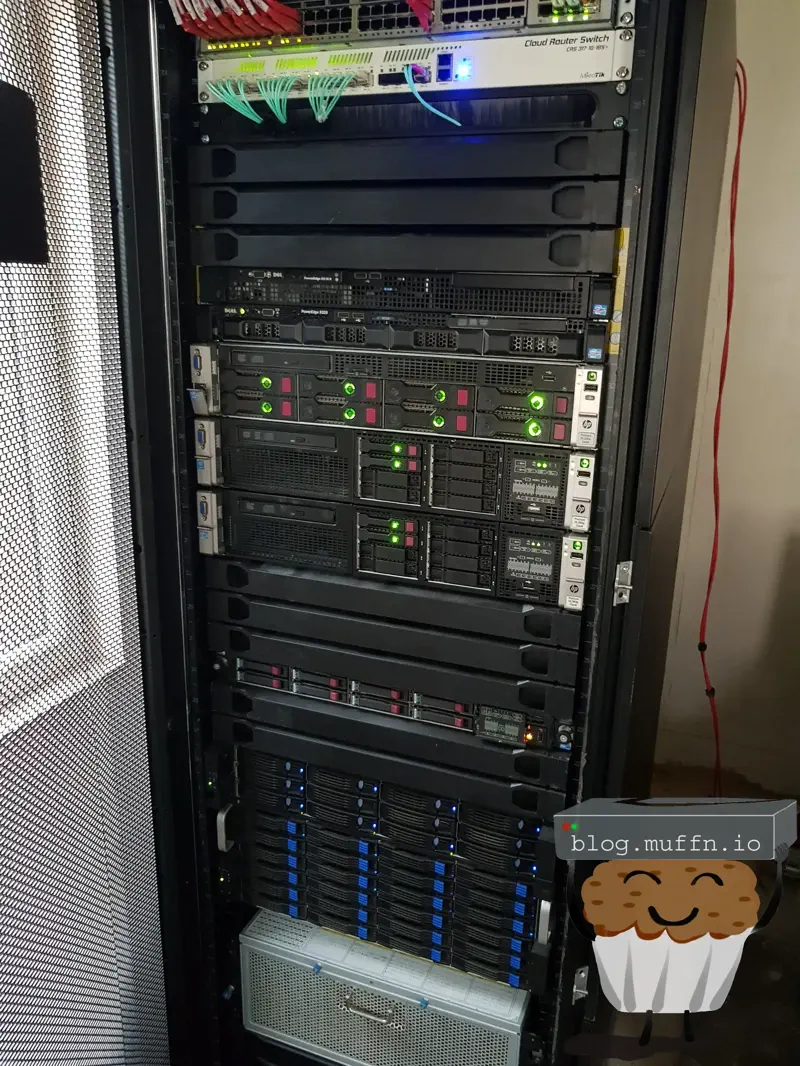
It was obscene, it was fun but it couldn’t last forever, eventually I had to downsize drastically and stop my obsession with enterprise gear.
Today having a lab is easier than ever, and it’s been great to see the community grow so much on powerful, efficient but cheap hardware, something I have fully embraced as seen on this very blog.
All this is to say, however, that my vSAN itch needed to be once again scratched, and so here we are. This time would be different though, this would be semi-production for my personal services.
Oh, and I want it to be fast.
📝 Pre-amble #
For the last few years my homelab has been more than just a tool to mess and learn, it’s been a place that hosts some of the most important services in my life. With my recent de-googling push, my homelab has taken a more important role.

De-Googling - Email, Storage, Photos & Location Without Google Services
Currently, most of my ‘production’ services are hosted at a remote site sitting on a single ESXi host. I have others but this is the ‘main’ guy. I don’t like having just one guy. So, hyperconverged stuff is cool and redundant, it’s a win-win.
Whilst this project won’t give me any site redundancy, that’s okay. I have backups via Veeam backing up to both local NAS and cloud storage, and I have tooling to get everything rebuilt easy enough. The vSAN cluster gives me redundancy against single-host failures, but my backup strategy handles the bigger disasters. I just need the flexibility of not having my stuff all in one place.
🐘 The Elephant #
To get the proverbial elephant out of the way, Broadcom is no friend of mine.
When the announcement dropped that Broadcom was to purchase VMware, I knew it meant nothing good. Years went by and seemingly nothing happened, until it all did. They done fucked it all up.
Now, whilst I do not support the actions of Broadcom I am a great lover of VMware. I spent my early days messing with it from the 5.5 days, fondly remembering installing this fancy ‘ESX’ and sitting at a yellow screen thinking “okay, what now?”.
Since then, I’ve built all my automated tooling around VMware products, I have VMware certifications, my career involves their products, and so I am rather happy using vSAN for my personal needs.
There will certainly be a day when I decide to jump ship for one reason or another, but that day is not today.
(Okay maybe that day is sooner than I anticipated when I initially wrote that, but more on that at the end).
🎯 Goals/Requirements #
My goals for this project are simple and pretty consistent with my other projects really (namely me being a cheapass).
2 Node vSAN Cluster -Whilst I would like to go with 3x hosts off the get-go, I simply do not want to have to spend all that money now, and the mirrored setup a 2 node provides gives me the redundancy I need for now. It would be easy enough to add a third host later. Two nodes will give me some more flexibility with my resources straight away too as my current host is running tight. Not everything needs to be HA after all.
Cheap - As before, I can be a cheapass and buying 2 of things can spiral quickly. Plus, fitting requirements inside a budget is a fun challenge. Getting the best ‘bang for buck’ is a great thing, it’s just too easy to throw money at these things sometimes. Cheap, of course is subjective so this is more of a ’let’s see how much I don’t need to spend’ than a strict budget.
AMD - I go where the value is and for the past few years, for me, Ryzen has been a great way to get good performance and efficiency for the money. My current main host runs a 5900x, and it’s been solid. Keeping things ‘in family’ is kind of necessary for live vMotion too, so I like to keep things either one way or another.
Small - I don’t know why I do this to myself. I don’t even live with this hardware so what it looks like is pretty irrelevant. Space isn’t even a massive issue (though not plentiful) but I like to keep things compact. It would be too easy to just get a phat ATX motherboard, slap that in a huge tower and call it a day.
Speedy - I’m building a vSAN cluster, I’m going to want it speedy. We live in interesting times for dirt cheap used hardware, so I’m going to take full advantage of that.
🔍 Potential Solutions #
🔹 Minisforum MS-02 #
I’ve been salivating waiting for the release of the MS-02. Ever since its announcement at CES 2024 I’ve been wanting to get my hands on one (or three). I own two MS-01s and really like them, but the non-homogenous cores of the Intel chips have been a real dissapointment for my VMWare workloads.
These would have been perfect, but firstly, there is no conrete release date at the time of writing, and secondly, the pricing for two or three of them with the additionals I’d have to get would take it way past what I’d be willing to spend.
🔹 Framework Desktop Mainboard #
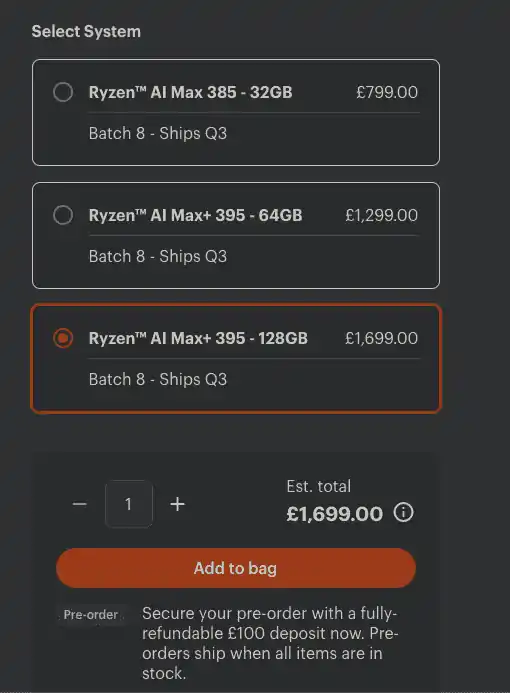
Something else which took my interest was the announcement of the Framework Desktop allowing for people to buy the mainboard. These things seemed pretty nuts so after the announcement I went over and checked the price for them and that shut that idea down pretty quickly.
🔧 Hardware #
| Item | Number | Vendor | Price Per | Total |
|---|---|---|---|---|
| ASRock X570M Pro4 | 2 | AliExpress | £82.05 | £164.11 |
| AMD Ryzen 7 5800x | 2 | eBay | £95 | £190 |
| Thermalright Assassin X 120R SE PLUS | 2 | Amazon | £17.90 | £35.80 |
| Fanxiang S100 | 2 | Amazon | £9.99 | £19.98 |
| Samsung PM1725a 3.2TB | 2 | eBay | £161.36 | £322.72 |
| Samsung PM1725a 800GB | 2 | eBay | £40 | £80 |
| Inter-Tech IM-1 Pocket | 1 | Amazon | £96.80 | £96.80 |
| Intel x520 DA2 | 2 | eBay | £21.59 | £43.18 |
| Crucial DDR4 128GB (4x32GB) 3200MHz CL22 | 1 | eBay | £180.94 | £180.94 |
| M378A4G43BB2-CWE (4x32GB) 3200MHz CL22 | 1 | eBay | £150 | £150 |
| ARCTIC P12 (5 Pack) | 1 | Amazon | £21.99 | £21.99 |
| Assorted gubbins1 | - | - | - | £23.12 |
| Corsair RM550x | 2 | Inventory | - | - |
| Cabling/Transceivers | - | Inventory | - | - |
Total: £1,150.65
🔹 ASRock X570M Pro4 #
Ultimately, AM4 was the way I went because absolutely fuck buying large amounts of DDR5. It’s a shame, I would have really liked to go AM5 with DDR5 for the obvious performance and capacity uplifts of the platform but I’m not about to drop DDR5 money twice in one go.
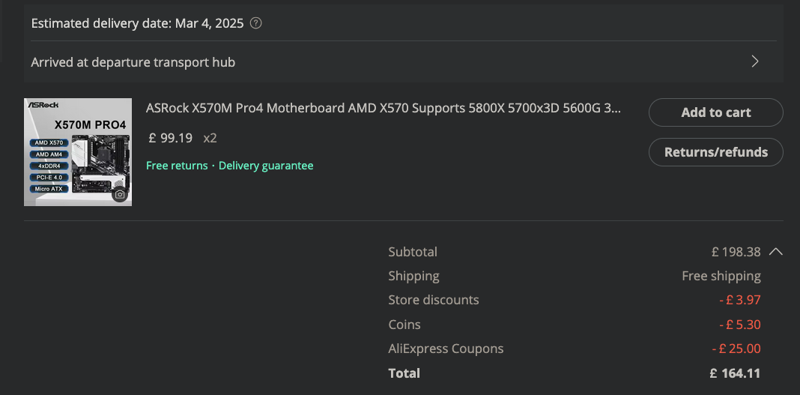
I was totally ready to get some B550M board on eBay from vendor selling multiple, but I happened upon the unicorn of motherboards, the ASRock X570M Pro4. One of the very few boards on the X570 chipset in MATX form factor.
Okay, I lied, it’s not the unicorn. The actual unicorns are the ASRock X470D4U and X570D4U, the former of which I own two of. These motherboards are the absolute GOAT2 of MATX server/lab AM4 motherboards, and they are incredibly expensive. I’m convinced ASRock only makes these boards by candlelight during a full moon, the fact that I have two of them is a miracle.
Anyway, if I could choose, I’d get an X4/570D4U, but the X570M Pro4 is still a great board and I somehow they’re only £100, albeit on AliExpress. In fact, after coupons and the like, I got a steal for two I’d say.
🔹 AMD Ryzen 7 5800x #
Obviously, I would like to deck these things out with two 5900x’s but that would have added about £100-£200 more over the 5800x’s and most likely would be wholly unnecessary.
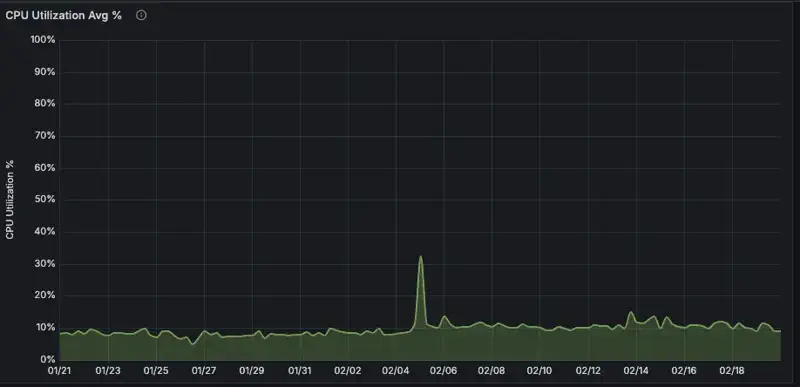
I’ll still have my 5900x host and 2x 5800x’s are plenty. CPU usage is not what I am lacking, in all honesty even the 5800x’s are overkill for my needs. My usage over the last month has been:
I considered 2x 5600x’s as those are cheap and still have great clocks, but I’m here now so may as well just get the better chip.
eBay best offer got me 2x from one seller for £95 each, which isn’t the cheapest I saw but far from the worst. The convenience of buying 2x at once from the same seller for a decent price is better than hunting for two separate better deals, when they came along.
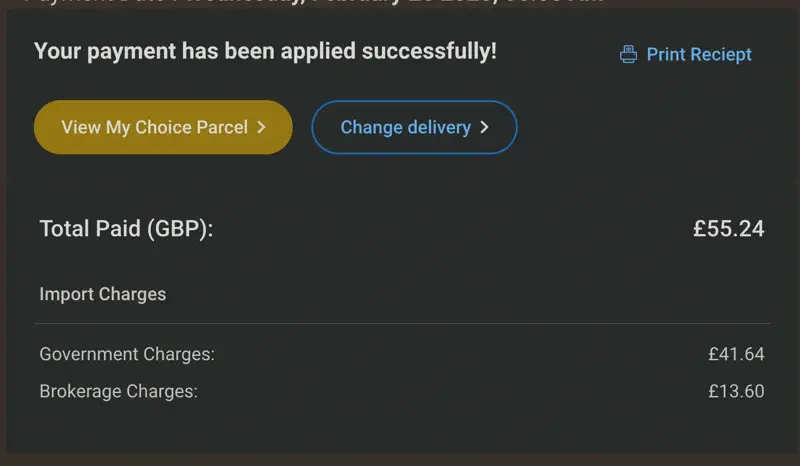
I actually had to pay import taxes on these as the seller was in mainland Europe but the seller did mention in the listing this charge would be refunded, so after the additonal £13.60 ‘fuck you’ fee on top of the customs charge I paid about £110 for each CPU, minus the refunded UK taxes. Not the best but certainly not bad.
Everyday I am truly thankful for the freedom Brexit has brought me to pay more for my goods and wait longer for them to arrive. To think, without the galaxy-brain wisdom of Brexit voters, I might still be suffering from all that efficient trade and lower costs. What a nightmare that used to be.
Thankfully that all worked out in the end though, right?
🔹 Thermalright Assassin X 120R SE PLUS #
As per, nothing to really say here. Thermalright are somehow making money on their coolers whilst being cheap and performant. Not for the price, just performant. The price is just a great bonus.
They have so many varients that it’s all rather confusing, I just got the one with two fans, no RGB and was the correct height for my case.
🔹 Fanxiang S100 #
Fanxiang is honestly a bit of a meme company. Kind of just appeared and flooded the market with cheap flash, I never gave them a second look, but I needed two cheap boot SSDs.
Surprisingly, the S100 is one of the few ’name’ brands in this price range that publish TBW (Total Bytes Written) stats, and these claim to have 60TBW which is hilariously bad but the things are £10 each, and they’re just to boot ESXi from, so I figured why not.
🔹 Inter-Tech IM-1 Pocket #
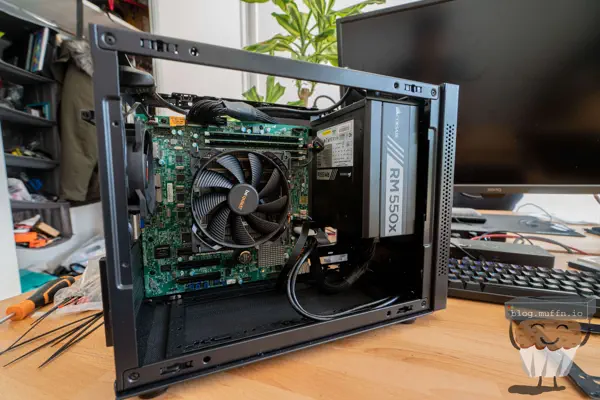
I used a clone of this case, which itself is a clone of the Sama IM01, in the following build:
Sizing Down - The SFF Homelab
It’s really small, and I like it. I don’t need anything fancy, I just need a box for the motherboard and PSU, no need for 3.5" bays or anything like that. Unfortunately, the clone I used is no longer available, and this is the only other clone I could find for slightly more money.
I no longer use that build, it’s been sitting actually gathering dust next to its replacement, so I decided to put most of its guts in the ‘inventory’ pile, buy another case and have 2 of them. I considered other AliExpress specials, Jonsbo has some real nice stuff for my usecase but by the time I’d bought two of them, I may as well just use what I have and buy another one.
🔹 Intel x520 DA2 #
It’s Intel 10Gb for cheap, not much else to say. One of them even came with a free SFP.
x520s are almost from the stone age these days, but for my use case, they’re more than enough. The only place I’ve ever considered getting it’s newer brother, the x710 is for my custom router, but then there the x520s were not the limiting factor and were able to route my full 5Gbps on that WAN.
There is one downside to these cards, but that’s easily remedied as you’ll see below.
🔹 RAM #
After looking on eBay, I got one M378A4G43BB2 set and one Crucial DDR4 128GB (4×32GB) 3200MHz CL22 set. Not idential pairs but they don’t have to be, they are both 3200MHz and have CL22 timings.
RAM was the biggest limiting factor for this build. My workloads in my production lab are mostly memory heavy. I run a lot of different applications on various VMs and 128GB just isn’t enough really, but it had to do.
If you’re asking why I’m talking about 128GB when in actual fact I will have double that, 256GB in the cluster, is because of HA. In order to have one host completely failover to the other, I need to ensure that one host has all the RAM it needs to run the cluster.
This is not a massive deal breaker, I can definitely fit my workloads in 128GB for now, but for the future this is a limiting factor. I simply cannot put more DDR4 into these systems, which is why a DDR5 platform would have been a better choice in this regard.
🔹 Corsair RM550x #
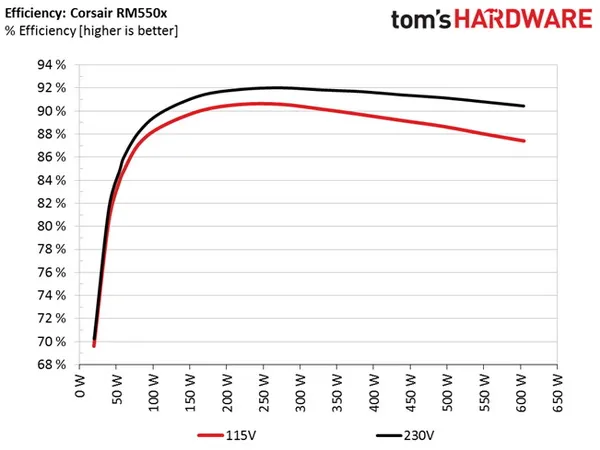
The case I’m resuing has an RM550x and I just so happen to have a spare, so this was easy. Ideally, I would buy Platinum rated PSUs, but using what you have is more efficient than buying whole new gear. The RM550x is at least gold rated, and Corsair make solid power supplies.
🔹 Gubbins1 #
Got into an AliExpress hole and ended up buying some other extra stuff which I might as well mention.
10x SATA Cables - £2.94 for 10x is awesome if they’re not complete garbage, also they’re orange.
8 Pin Extender - Case is tiny so don’t need this but they do come in handy.
DB9 RS232 Serial To IDC 10 Pin 9Pin Header - These CPUs have no onboard graphics and the board has a serial port which which this will connect to and present a DB9 serial port on the back of the case. Eventually, I’ll probably get another JetKVM and cable all my servers into it for OOB so this is just for the future.
ATX 24 Pin 90 Degree Adapter - Looked cool, is cheap, no idea which orientation I needed so I bought two of each.
💾 Storage #
Storage was a difficult one to decide on. Initally, I was thinking straight up Gen 4 NVMEs to make use of the x570 chipset I’d bought into, however, pricing all of that up was getting spenny, fast.
The ‘issue’ with my plan in a 2 node vSAN is that I’m essentially in a RAID1 configuration, so I only really have half of the storage I purchase actually be usable, so this adds up quickly.
My restrictions/considerations were:
- Any storage one host has, the other must have identical, so no ‘mix and matching’.
- VM storage usage on my current host was about 4TB, I’d managed to get this down to 2.5TB, so I would need at least 3TB usable off the bat.
- NVME is a must of course. I could get good deals on SAS SSDs but not utilising NVME for vSAN would be a waste IMO.
- Need capacity and cache disks for vSAN OSA, I could forgo cache disks with vSAN ESA but more on that later.
- Forgo storage redundancy on the hosts themselves and rely on the vSAN cluster for redundancy.
🔹 Samsung PM1725a #
I initially went hunting for some Gen4 NVMEs to really utilise the X570 chipset, but after some hunting around I decided that there was a sweet spot for price:performance:capacity and Gen4 ain’t it. Instead, I went down the rabbit hole of used enterprise NVME storage and was not disappointed.
I found a listing for 2x 3.2TB Samsung PM1725a drives for £320 including shipping, this is a pretty awesome deal since they are supposedly ‘almost brand new’. Now, these aren’t Gen4, but they’re proper enterprise-grade NVMe with all the bells and whistles. At about £50 per TB for enterprise storage, it was hard to pass up.
For the cache tier, I needed something with good write endurance and quicker or as quick as my capacity drives. As luck would have it, I found 800GB PM1725a drives for £50 each. I offered £40 for 2x and it was accepted, an absolute steal. Using the same enterprise drive family for both cache and capacity tiers? Yes please.
PM1725a Specifications:
| Specification | Capacity Tier (3.2TB) | Cache Tier (800GB) |
|---|---|---|
| Sequential Read | up to 3,500 MB/s | up to 3,500 MB/s |
| Sequential Write | up to 2,100 MB/s | up to 2,700 MB/s |
| Random Read (4K, QD32) | up to 750,000 IOPS | up to 800,000 IOPS |
| Random Write (4K, QD32) | up to 120,000 IOPS | up to 140,000 IOPS |
| Endurance | 8.74 PB written (5 DWPD) | 8.76 PB written (12 DWPD) |
| Features | Power Loss Protection End-to-end data protection |
Power Loss Protection End-to-end data protection |
| Interface | NVMe 1.2a | NVMe 1.2a |
These should last me as long as I am willing to run them, I’m not going to get anywhere close to their endurance.
These drives should give me consistent performance, excellent reliability, and having enterprise features throughout the storage layer is just… nice. Plus, if I need to expand later, I can just add more PM1725as when I find good deals.
As you will see below, I have so much PCIe to play with even after these drives are in play I doubt this will ever be a limiting factor for me.
🛠️ The Build #
With everything purchased and sitting in my office, it was time to build the two machines.
Prep involved removing the old motherboard from the existing case I am reusing. I have no idea what I’ll do with it yet but I know if I add it to the pile I’ll be looking at this thing in 5 years thinking I should have gotten some money from it whilst it was still relevant, so I will endeavour to sell the setup. The board is a Supermicro MBD-X11SSH-LN4F, E3-1285 v6 with 32GB DDR4 ECC UDIMM memory.
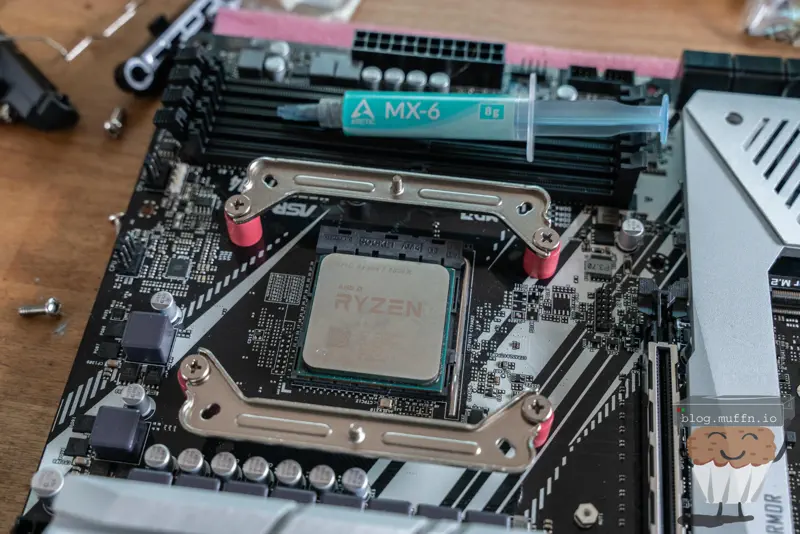
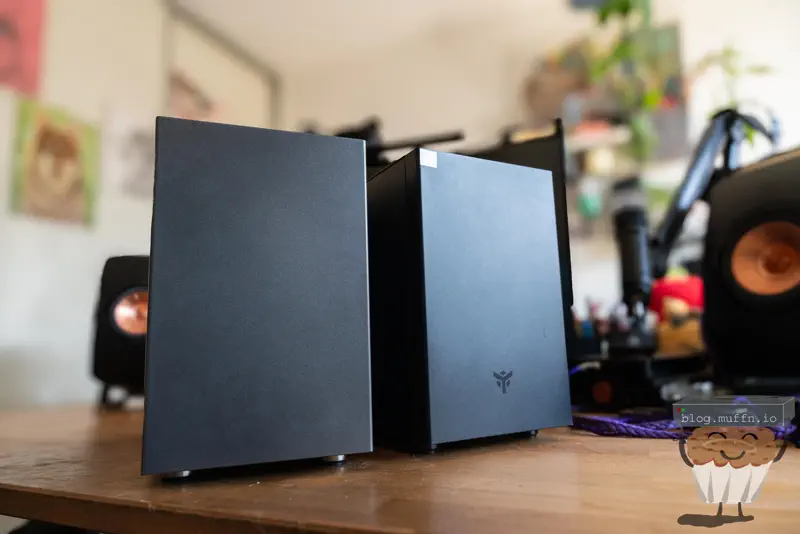
The build itself was your standard SFF build, I won’t go into too much detail but here are some pictures of the build/parts.
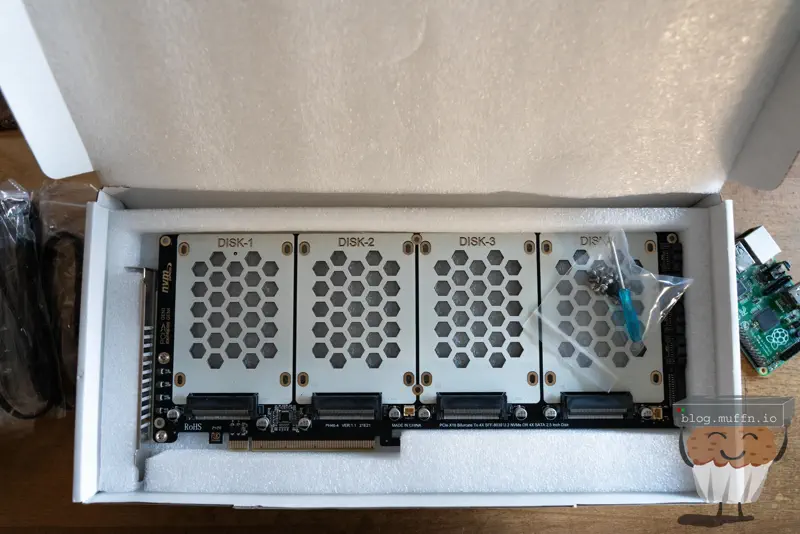
The 4x U.2 expansion card is pretty dope, immediately I was a bit worried about this fitting despite me checking the dimensions beforehand, but more on that later.
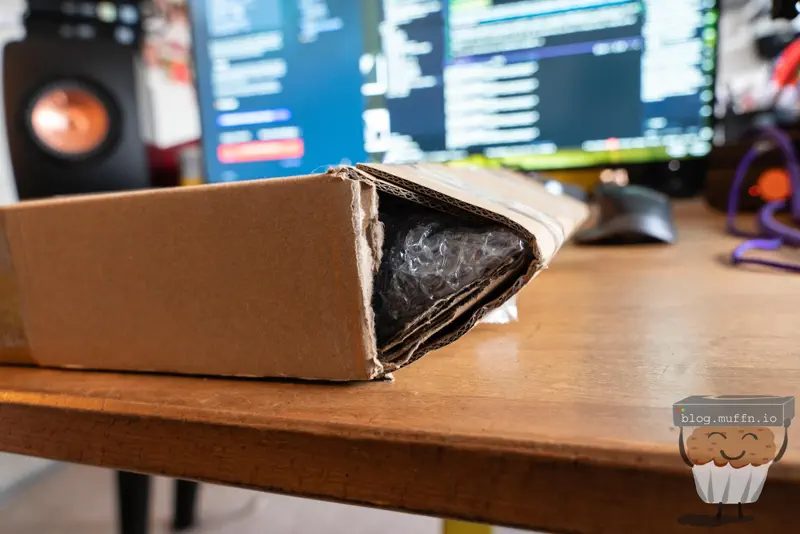
The motherboards from AliExpress came in an interesting box, seems like they realised the box they had was just a bit too small? Never seen this before but it did give me a bit of a chuckle. The motherboards themselves were immaculate, even came with IO shields which were sealed. This is usually quite hit or miss I have found with aftermarket mobos.
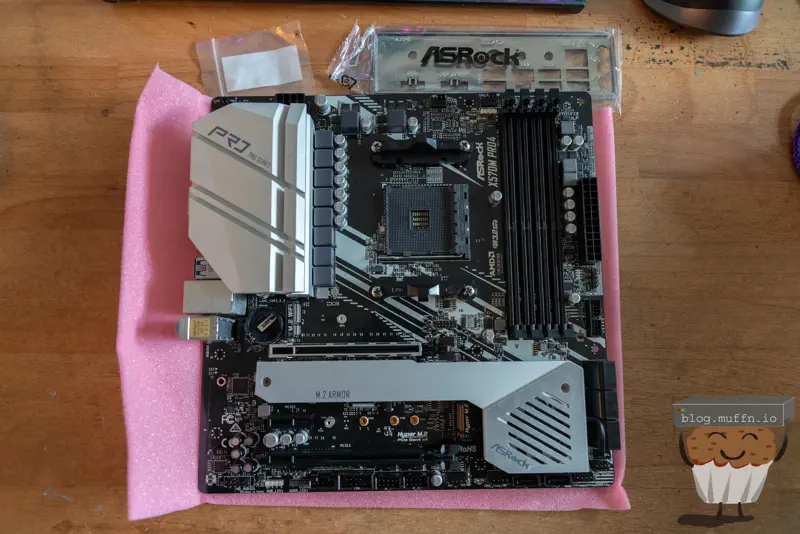
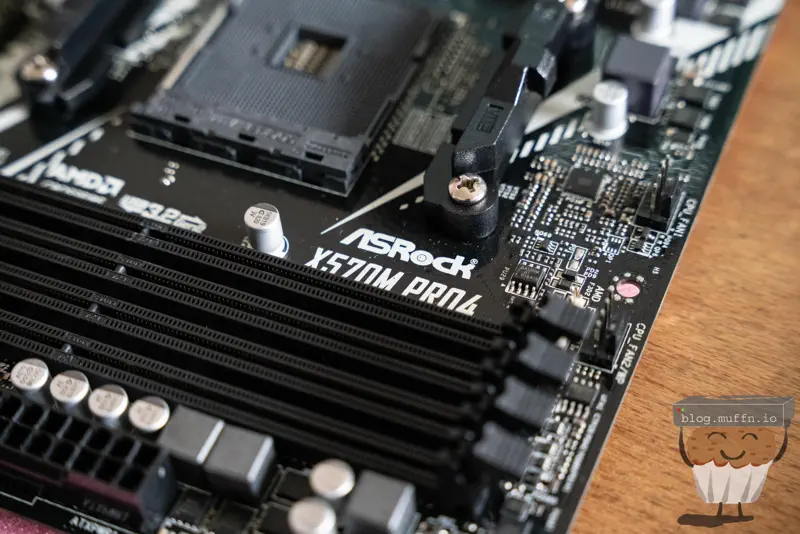
Thermalright mounting is really good, on top of everything else about them. Makes for a frustration free install.
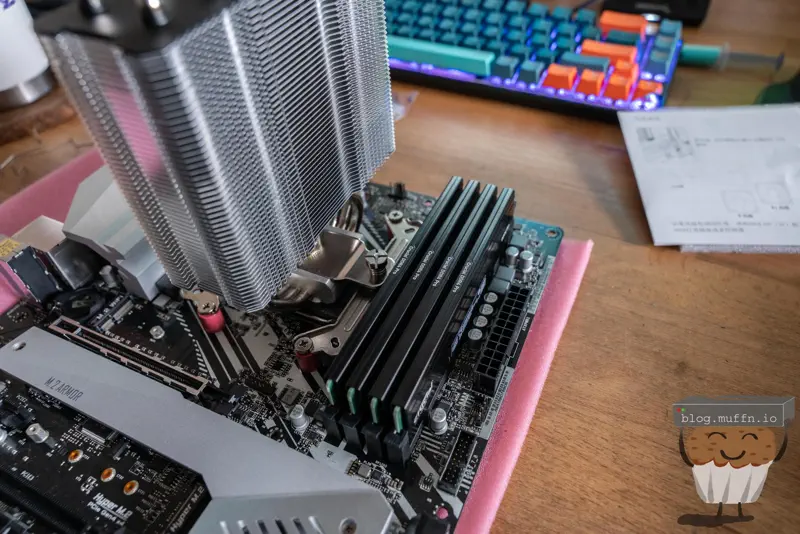
Soooo, the U.2 breakout card did indeed fit, but it fouled the PSU’s modular cables. I tried my best to bend the cables out of the way and use as few cables as possible, and this is the best I could do.
It does look pretty bad, but I assure you it works and there it’s not adding a great deal more stress to the PCIE slot on the motherboard.
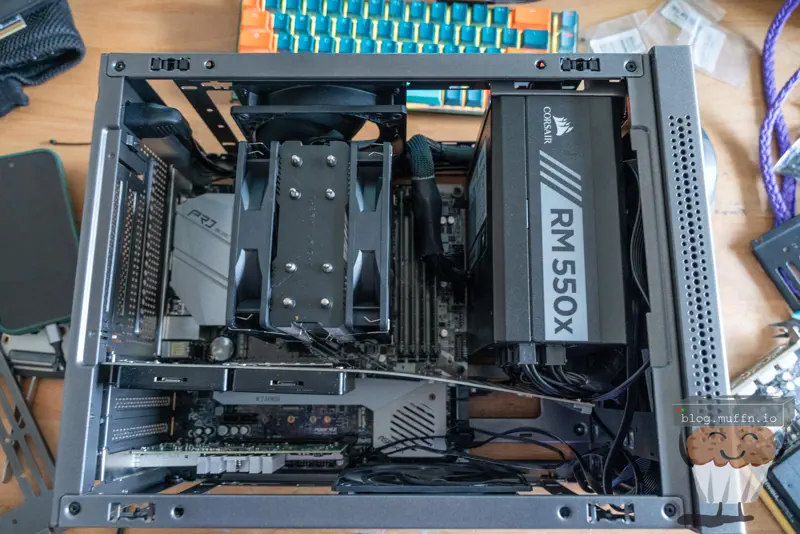
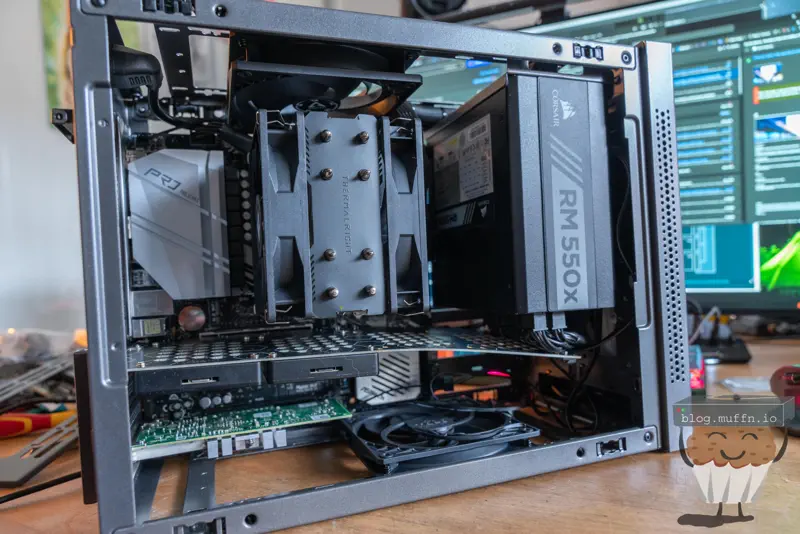
Okay, it does look pretty bad. ¯\_(ツ)_/¯
Surprisingly, a U.2 drive can still be installed in the rightmost slot of the expansion card despire its bend. This does mean I could use all the slots on the card at some point, but to be completely honest I don’t see myself doing this, it would have been better to buy a card that splits the lanes into x8x8 and only support 2x U.2 drives but this was only slightly more expensive so I thought why not.
You can see the X520-DA2 is installed into the last slot on the motherboard at this point, leaving one x1 slot free inbetween the two cards.
Also you can see the two fans which were installed at the top and bottom of the case, the bottom being a pull into the case with the top exhausing out. The bottom fan helps to keep the NIC and U.2 drives cool as they can get toasty.
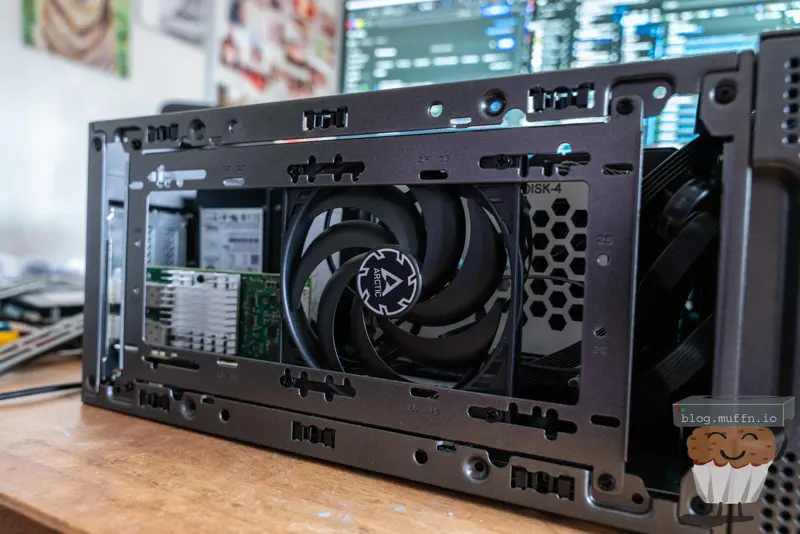
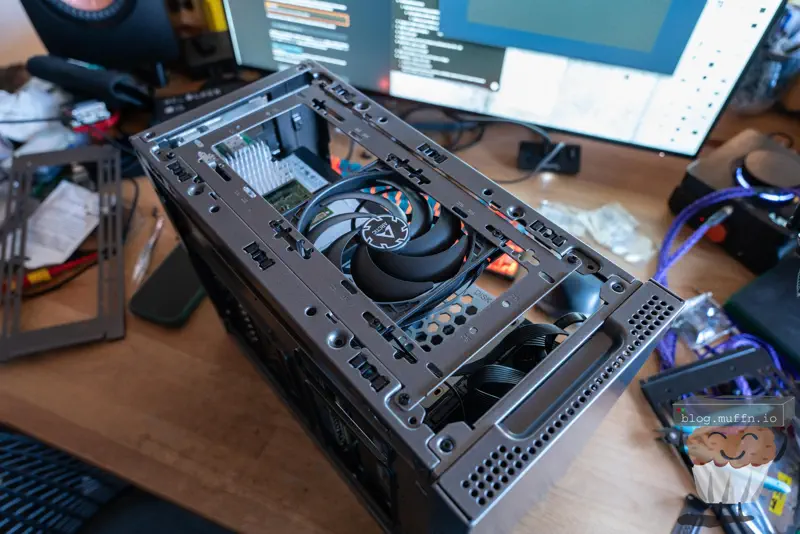
The case being so small, there is little space to put extra components or wire management, but there is in fact a perfect place for this, behind the front panel. This is where I put the boot SSD as well as some bulk of power cables.
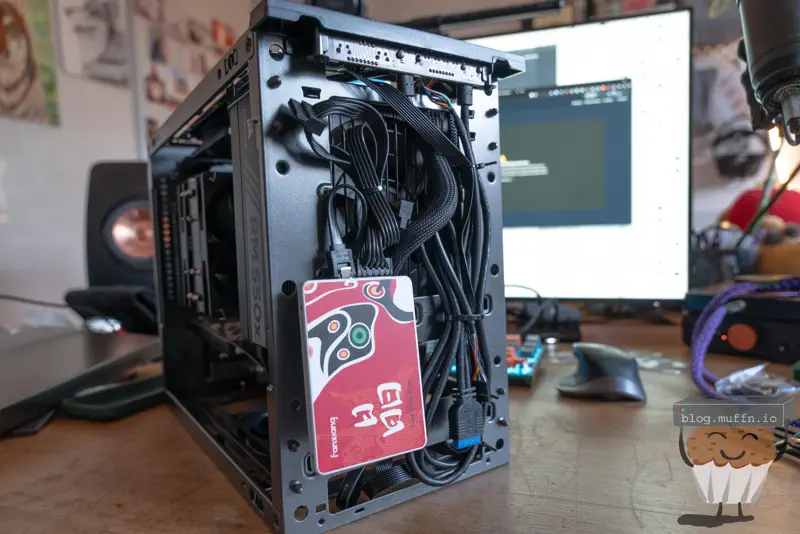
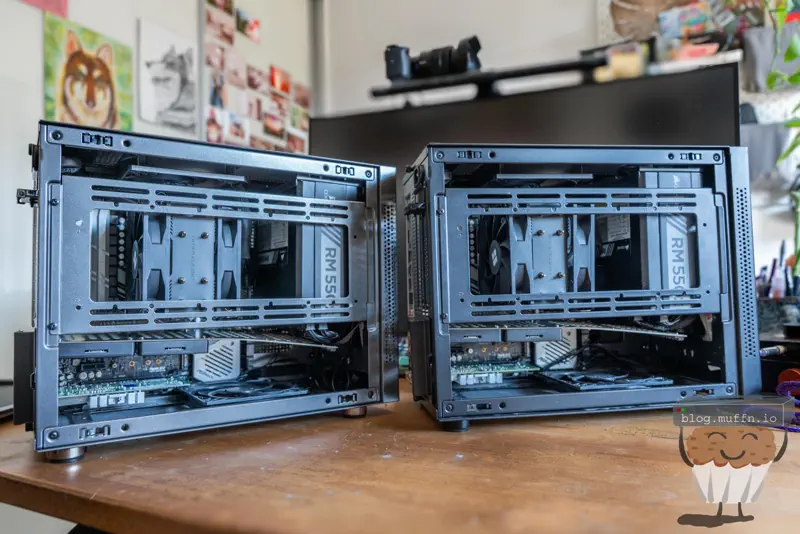
And that’s it for the build really, rinse and repeat a second time and I now have 2 SFF machines ready to go.
🔌 Power & Noise #
Here’s some power usage data for all you power nuts. Each node draws about 45-55W at idle and can peak around 120W under load. With both nodes running, I’m looking at roughly 100-110W total for the cluster at idle.
This isn’t your average 10w mini pc, but it’s also not powered by a dorito. The U.2 drives probably use more power than most mini pc’s by themselves.
Noise-wise, they’re surprisingly quiet. The Thermalright coolers and case fans keep thermals in check without being obnoxious. I can’t hear them over ambient room noise, I do hear them if they are under load, but this is good as the fan curve is working as expected.
🚀 Overclocking #
I won’t go over this too much because this will be touched on again further down, but my thinking was something like “I have an x570, it would be silly to not overclock it, literally free performance.”
In that vein, I did some overclocking using PBO. I didn’t go overboard but I did want to see how far I could reasonably push the CPU. I ended up using curve optimizer on all cores and Load-Line calibration, the OC settings were as follows:
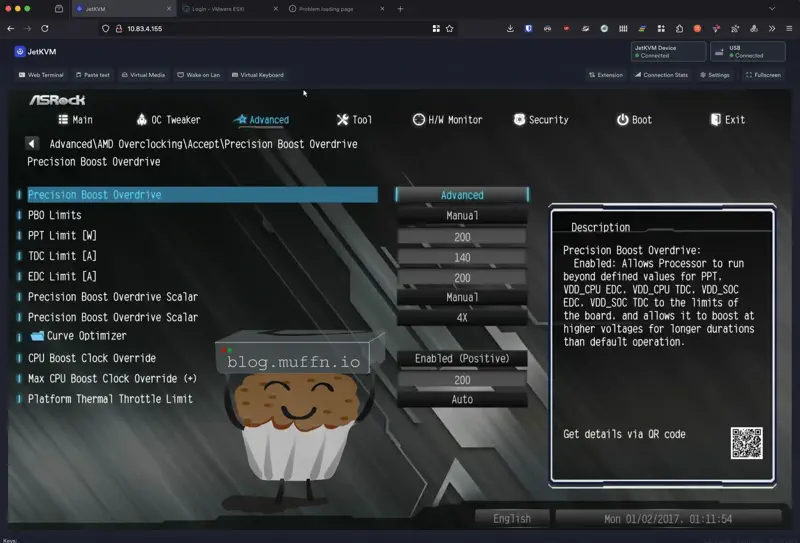
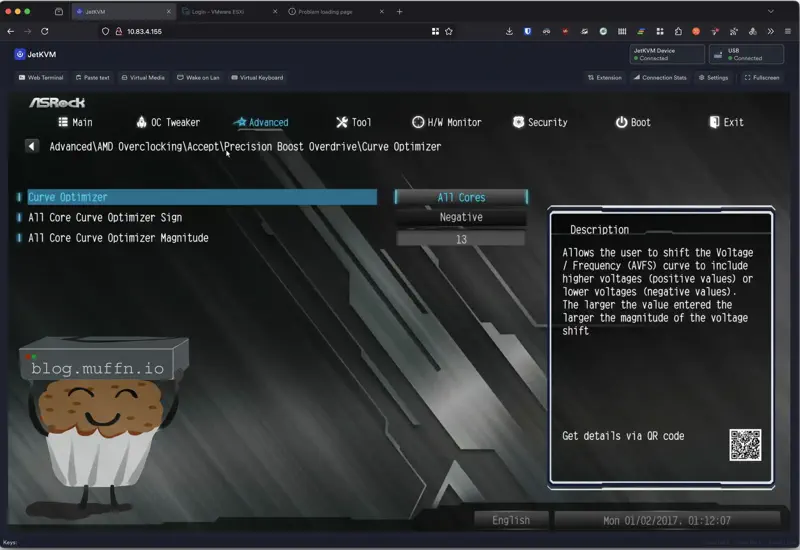
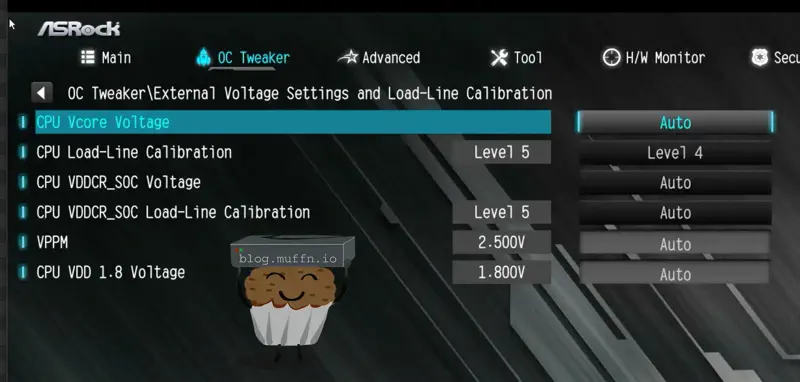
So, after a bit of tweaking, I ran several benchmarks to see how ‘stable’ the overclock was.
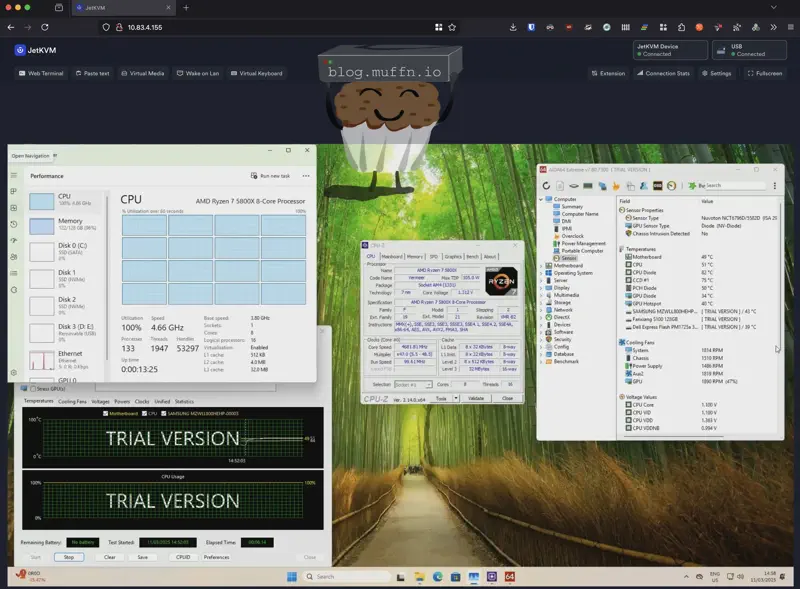
After being able to let both machines sit overnight running the stress tests and not crashing or burning my house down, I figured it was all good and so moved on.
⚙️ BIOS #
The only other notable setting in the BIOS was making sure to enable bifiratation. Even though I had made sure to read plenty of documentation and threads on the internet to ensure this board supported it, I was still very happy to see the option there.
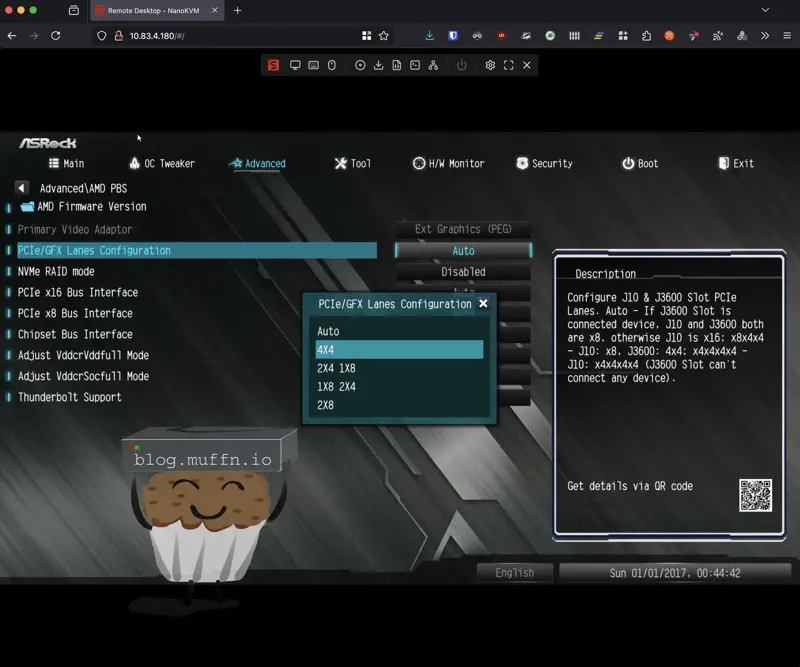
I set this to 4x4 to support my 4x U.2 expansion cards.
🔓 SFP Unlocking #
I was hoping this was already done on the card I bought, alas, it was not. I could not get my x520-DA2 cards to work in ESXi, the network would just never come up. I had a good hunch why this was, SFP locking.
I do have a few Intel optics that I keep around, so after putting this in the card and my switch, everything came up. So, the card had to be unlocked.
Vendor lock-in strikes again. Intel decided that their cards should only work with Intel-branded SFP+ modules. Not because of any technical limitation, but greed, as usual. Why sell just a network card when they can force you to buy their SFP+ modules too?
Now, it’s not just Intel that does this, most enterprise manufacturers do this, and to that I say, fuck you. Thankfully, this is easily remedied on these cards and is one of the many reasons I chose them.
This artificial restriction is enforced through a simple bit in the card’s EEPROM at address 0x58. When bit 0 is set to 0, the card operates in “Intel modules only” mode. Set it to 1, and it’ll take anything you throw at it.
The thing is, SFP+ modules are largely commodity items. The same Taiwanese ODM probably makes Intel’s “premium” modules and the generic ones you can buy for a fraction of the price. The only difference is a few bytes in the module’s EEPROM identifying the vendor. This is why fs.com exists in the capacity they do, at the end of the day there’s nothing really special about the majority of modules, just their EEPROM.
Intel’s driver checks the vendor ID and throws a tantrum if it doesn’t see “Intel” stamped on it. It’s about as arbitrary as restrictions get, which is exactly why it can be bypassed so easily.
There’s an excellent Python script by ixs that automates the entire process of flipping the magic bit in the EEPROM.
The script works by using ethtool to read the current EEPROM configuration, flip the restriction bit, and write it back.
Upon booting into an Ubuntu live image with illegal SFP+ modules, I could see the card was not being listed as an ethernet device, and checking the logs tells you exactly why:

But, simply run the script and bada bing, bada boom, the card is no longer cucked.
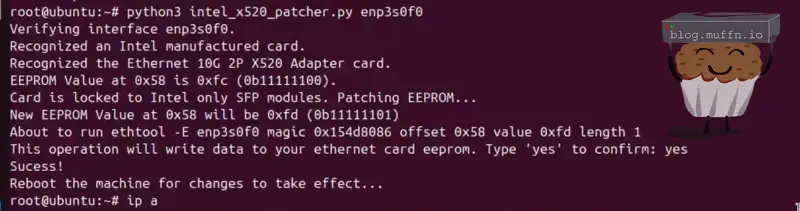
The sweet thing about this is that it’s permanent. Once you’ve flipped the bit, the card will accept any SFP+ module forever, even in different machines or operating systems. You’re not relying on kernel module parameters or driver hacks.
🧱 Sector Sizes #
After getting everything built and ESXi installed, my PM1725a drives were nowhere to be found. They simply didn’t show up in ESXi’s storage management interfaces.
After some investigation, I found the root cause: sector size incompatibility. The PM1725a drives were formatted with 512-byte logical sectors, which VMware ESXi 7.0+ doesn’t directly support for certain NVMe configurations. VMware heavily prefers 4K native (4Kn) drives or 512-byte emulation (512e) drives where the physical sector size is 4KB but logical sectors are emulated as 512 bytes.
Using ESXi’s NVMe tools, I could see the drives and their capabilities:
[root:/opt/vmware/nvme] ./esxcli-nvme-plugin --op nvme.device.get -A vmhba1 | egrep -A1 "Serial|Model"

      S3B0NX0KC05091

Dell Express Flash PM1725a 3.2TB SFF
Looking at the LBA format support revealed the issue:
[root:/opt/vmware/nvme] ./esxcli-nvme-plugin --op nvme.device.namespace.get -A vmhba1 -n 1 | tail -40


0
0
512
Better performance


1
8
512
Degraded performance


2
0
4096
Best performance


3
8
4096
Good performance
The drive was defaulting to Format ID 0 (512-byte sectors), but ESXi wanted Format ID 2 (4096-byte sectors) for optimal compatibility.
The solution was to format the NVMe namespace to use 4K sectors. Using ESXi’s NVMe formatting tools:
[root:/opt/vmware/nvme] ./esxcli-nvme-plugin --op nvme.device.namespace.format -A vmhba1 -n 1 -m 0 -p 0 -l 0 -s 0 -f 0
lib/ssl: Failed to load dictionary /etc/vmware/ssl/client.conf. Init with default values.
lib/ssl: Failed to load dictionary /etc/vmware/ssl/server.conf. Init with default values.


Format successfully!
The command threw some SSL-related warnings but the format operation completed successfully. After this, the drives immediately became available to ESXi and could be used for vSAN configuration.
Traditional drives used 512-byte physical sectors, but as drive capacities increased, the industry moved to 4KB physical sectors for better efficiency. This created three main formats:
- 512n (512 native): Both logical and physical sectors are 512 bytes
- 512e (512 emulation): Physical sectors are 4KB, but logical sectors are emulated as 512 bytes
- 4Kn (4K native): Both logical and physical sectors are 4KB
According to VMware’s official documentation, vSphere 6.5+ supports 512e drives, and vSphere 6.7+ supports 4Kn drives for HDDs. However, for NVMe SSDs, VMware strongly recommends 4K sector sizes for optimal performance, as 512-byte operations on 512e drives can cause read-modify-write penalties due to sector size misalignment.
The PM1725a drives, being enterprise-grade, support multiple sector formats but ship with 512-byte sectors by default. The format command essentially converted them from 512n to 4Kn format, eliminating any potential alignment issues and ensuring full VMware compatibility.
⚡ OSA vs ESA #
🔹 Lore #
vSAN has two architectures - the Original Storage Architecture (OSA) and the Express Storage Architecture (ESA).
OSA is the original storage stack with components like the vSAN Client Cache and Capacity Layer. This is what most including myself are familiar with and to be honest, can sometimes be a bit of a headache.
ESA was introduced with vSAN 8.0 and redesigned the storage stack, offering better performance and efficiency through a simplified architecture that eliminates the cache tier requirement. While ESA is the future of vSAN, OSA remains fully supported and is still the go-to choice for many deployments, especially in environments using older hardware or requiring specific features not yet available in ESA.
There’s plenty of literature out there already on the subject, so if you’re interested in the nitty-gritty, knock yourself out.
TLDR: ESA is the new hotness, OSA is still supported until Broadcom decides it doesn’t make them enough money.
🔹 Deciding #
ESA would be perfect for my setup. The simplified storage stack would be great, and the efficiencies over OSA would be great.
But there’s a catch. While ESA can technically run with less than its recommended 192GB+ per node, it’s significantly more RAM-hungry than OSA simply by existing. In a two-node setup where I’m effectively running RAID1 (not quite, but close enough), I need every bit of usable RAM I can get for my actual workloads.
Then there’s the whole supportability thing. I could probably get it installed and configured, but I’d be looking at constant unsupported configuration warnings and unhealthy status messages in vCenter. It’s not the end of the world, but it’s not ideal.
So OSA it is. It’s not like it’s a bad choice - it’s just not the new hotness. With PM1725a drives for both cache and capacity tiers, I’ll still get sweet performance. So, more boring but less effort, sometimes boring is good.
📦 Deploying vSAN #
One thing I later learned about ESA was that it’s only supported on nodes that are certified for it by Broadcom. I just assumed it was ’nice to have’ but it’s actually a requirement, you just cannot deploy ESA with compatiblity warnings, for the most part anyway..
Funnily enough, when you go through one of the wizards (‘Cluster Quickstart’) you can actually deploy ESA despite the warnings, unsure if this is a bug or a feature but I did it for shits and giggles on my first deployment and it did in fact deploy.
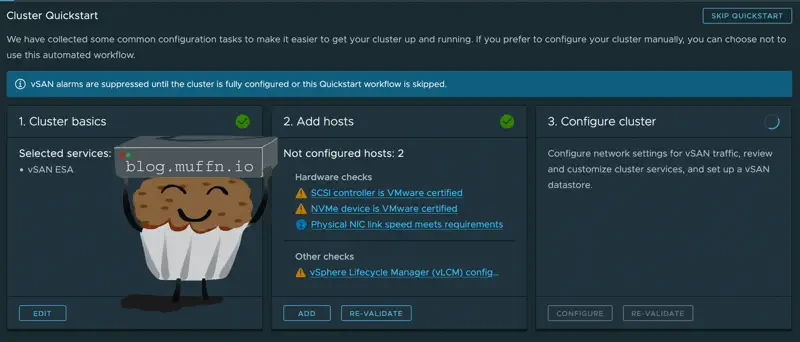
When ESA was deployed I got the expected warnings, mainly about my NVME drives not being supported.
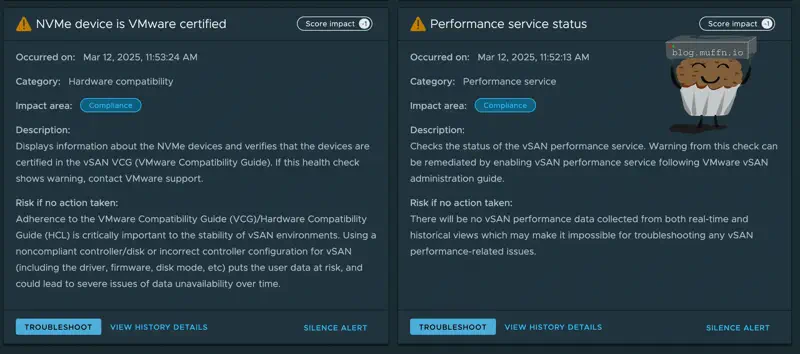
This by itself is fine, the real issue was the monstrous 61GB of RAM it was using doing absolutely nothing.
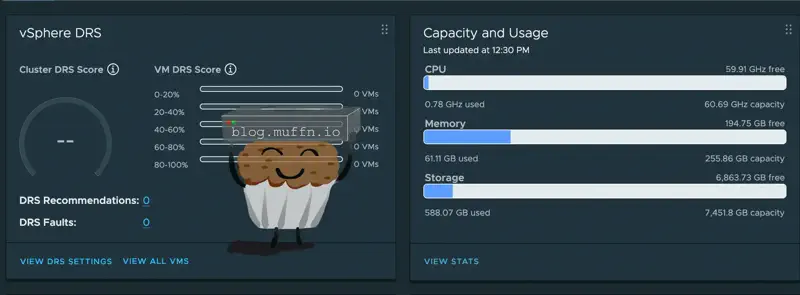
So, yeah, this wouldn’t work, I knew this already but it was nice to confirm this. When deploying OSA, I saw that ESA deployment was indeed greyed out due to my incompatible hardware, so top tip to bypass this, I guess?

The OSA deployment went as expected with nothing notable, I set the 800GB PM1725as as the cache tier and the 3.2TB PM1725as as the capacity tier.
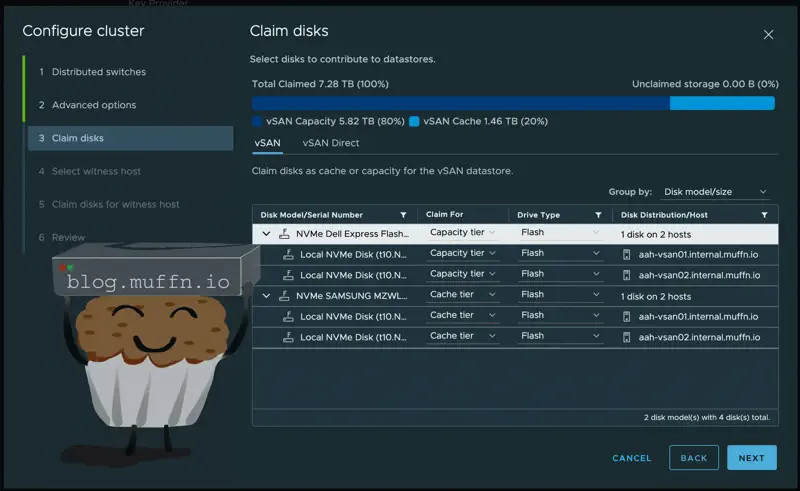
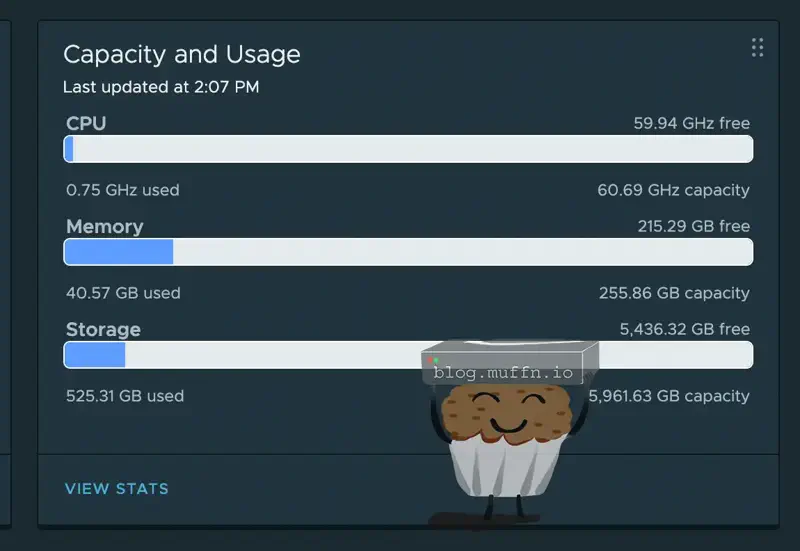
Whilst the OSA deployment still used more memory than I would like, 40GB is more reaosnable than 61GB. This is what the cluster looked like after the OSA deployment.
🔀 Networking #
Each host has 2x 10GbE ports, currently I only use 1x on my existing nodes connected to my CRS317-1G-16S+ as this has been enough, but with these vSAN nodes I will be using both.
In an ideal world each NIC would be connected to a different switch entirely, with those having some kind of MLAG but this site is nowhere near that fancy.
The networking will be as follows:
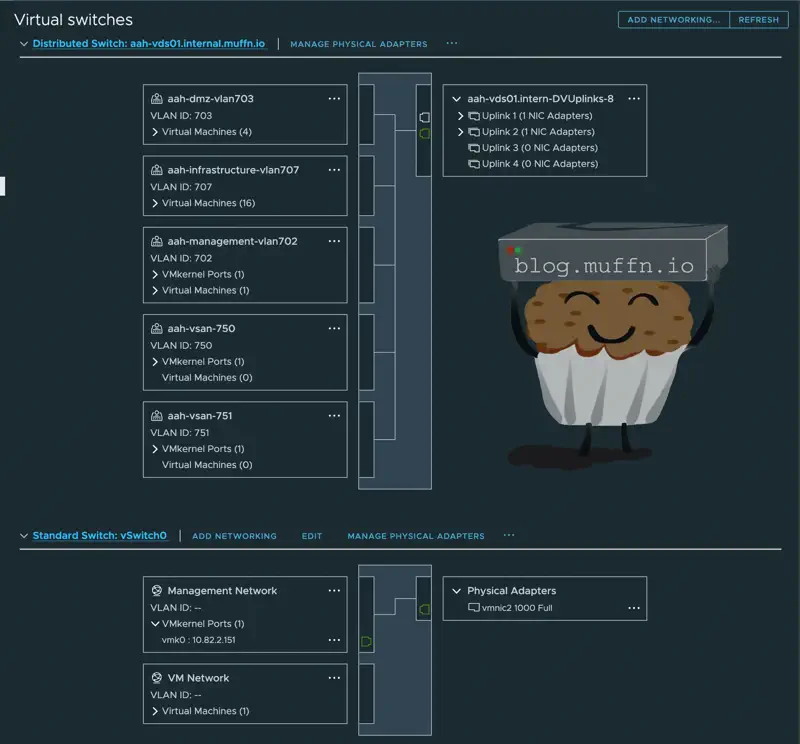
All port groups3 and vmKernels4 are attached to a main dVS5 which has both 10Gb/s ports connected to my CRS317-1G-16S+. Virtual machine networking via the PGs and the management vmK use ESXI’s default load balancing.
In order to use both NICs for vSAN traffic but to also use these for management and VM traffic, everything must be on the same vDS. To do this, I have one vDS with both 10Gb/s NICs connected to it, with 2 VLANs created for vSAN traffic. In the port group settings for the vSAN PGs, I have the ’teaming and failover’ set to use different active/standby uplinks for each PG.
What this essentially does is it will use the first NIC for the first PG and the second NIC for the second PG, and if one NIC fails both PGs will use the single NIC.
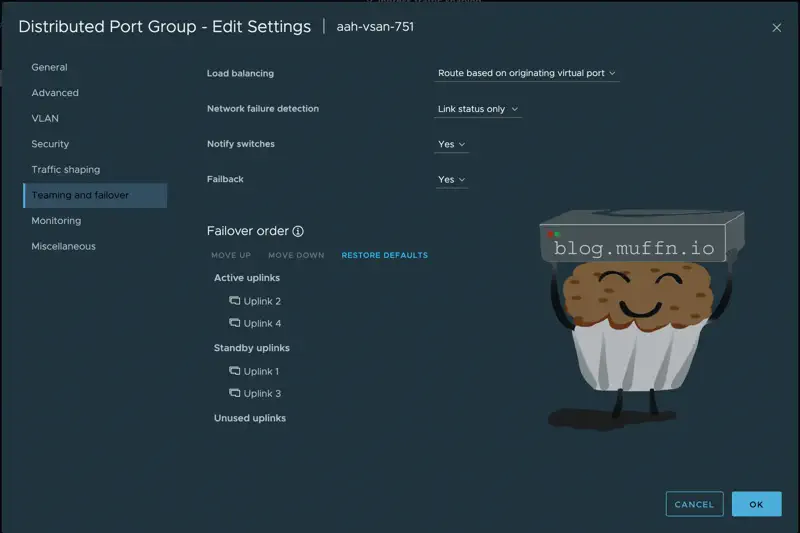
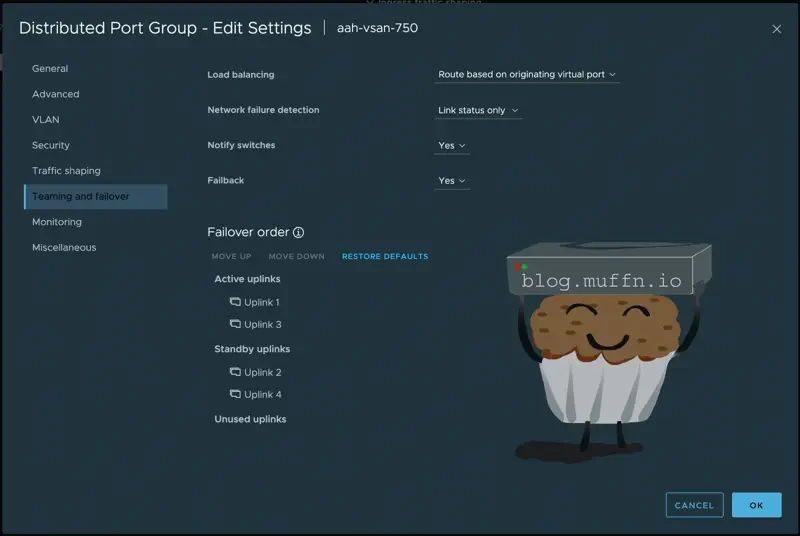
Then, 2 additional VMKs are created for the vSAN traffic, one for each PG. This doesn’t need to be routed, but the VMKs need to be able to speak to each other across hosts.

With this setup, I am able to use both NICs for vSAN traffic, and also use them for management and VM traffic. If one of the NICs fails or needs maintenance, the other NIC will take over for both PGs and VMKs. In practice this works very well as ESXi uses both links equally when it can, giving me 20Gb/s of vSAN traffic.
As well as all of this, I do have the onboard Gigabit ethernet port connected to another ethernet switch, this is used for the ‘main’ management so I am not reliant on the 10Gb switch and NICs to access the hosts.
🔑 Licensing #
I get asked about VMWare licensing a lot, and I’m not entirely sure why. If you want to run VMWare products for your own personal use and not for profit/commercial use, it’s pretty simple.
I used to pay for VMUG back in the day and after that my employer covered the fees for a year or two but for a long time I’ve just obtained licenses.
How? Well I’ll leave you to work that one out.

If you have some weird ethical stance about not giving money to an ethically questionable billion, almost trillion-dollar company, then that’s on you buddy.
Admittedly, getting the downloads can be a PITA these days, but I’ll leave you to work that one out too.
🚋 Migration #
Time to migrate workloads from my existing 5900X host to the new vSAN cluster. Since both the 5900X and 5800X are Zen 3 CPUs I assumed this would be easier than it was.
Attempting to vMotion failed with a wall of unsupported CPU feature errors, IBRS, Speculative Store Bypass Disable, Shadow Stacks, and about a dozen other security mitigations and instruction sets.
Despite both being Zen 3, the hosts were presenting different CPU feature sets to VMware due to different BIOS versions and/or microcode, or something else, I’m not quite certain to be completely honest. The new hosts were upgraded to the latest BIOS and microcode, so I assumed the ‘old’ host was the issue, but it was running most of my production workload so I left it alone.
The solution was to enable EVC on the cluster at Zen 2 level rather than Zen 3. Not ideal, but the “lost” features are mostly security mitigations and new instructions that my VMs don’t use. I did have to enable EVC on the VMs themselves as the ‘old’ host was not in a cluster, I tried adding it to a single node cluster but EVC was still not available.
Once EVC was set on each VM, and the VM rebooted I was able to vMotion the VMs to the new cluster. All that was left was the witness node, vCenter itself and Plex, which has a GPU passedthrough to it so this will need to stay.
Here is how my cluster looks after a few months of running with most of my workloads running on it.
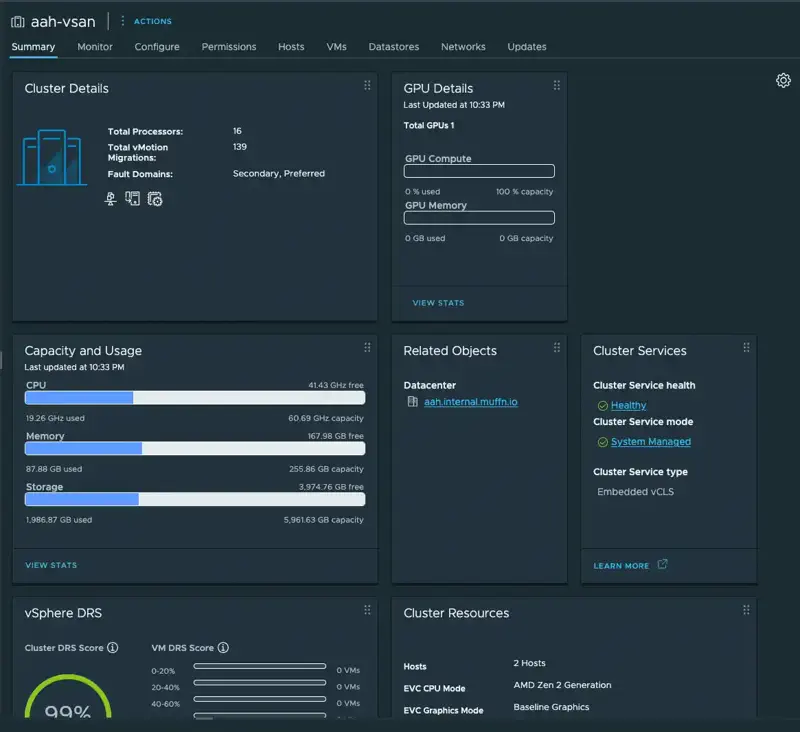
DRS and HA work (more on how I know this below). DRS is unfortunatly not that exciting, despite asking the cluster to balance VMs evenly across hosts, I have more than enough resources on one host to run most of my VMs so one host always has most of the workload, but that’s fine.
🔥 Overclocking Gone Wrong #
So it turns out that overclock I did because ‘I might as well right?’ was a bad idea. A few hours after I migrated everything, I got notifications that a lot of my apps were down. When I looked at vCenter, everything had failed over to the other host and one host was nowhere to be seen.
My main lab is not at my flat, thankfully I wasn’t far away so I went back, rebooted the thing, waited for it to come back and left again. Unfortunately I couldn’t plug in a monitor to see what was up, because there are no graphics adaptors in these things, I need to put in a GPU to actually do anything in person which on this board involves removing one of my expansion cards 🥱.
Anyway, it was late and I was tired, so I didn’t investigate any further. The next morning I woke up to similar alerts, everything had gone down but thankfully recovered onto the other host, but this time it was the host that didn’t die that died, and all VMs were running on the host I had rebooted.
I ran the following on both hosts: esxcfg-advcfg -s 30 /Misc/BlueScreenTimeout this command is a must-have for remote hosts as it will automatically reboot the host on a crash, in this case after 30 seconds.
And so this went on for a few days, they would take turn flip-flopping, rebooting several times a day and everytime I would have a bit of an outage but recover a few minutes later as HA did its thing. They never died at the same time which was useful, but I knew I had to fix it sooner rather than later.
I did try to dig through the crash dumps but never really got anywhere, but I knew what the issue was really, they were not as stable as I had suspected from the overclock. Eventually, I took the hosts back home after migrating back to the 5900x host and just removed the overclock completely. I considered just tuning it down a tonne but if it exhibited the same behaviour I wouldn’t know if I didn’t go down enough, or if there was some underlying issue.
Anyway, I’m writing this a few months later and they’ve been incredibly stable. What exactly was causing this I couldn’t tell you, clearly not something prime95 was testing in my overnight stress test.
🛸 Performance #
Time to see if this thing can actually shift some data or if I’ve just built some expensive space heaters.
I ran various fio6 tests against a Debian VM with everything else running on the cluster and got the following:
| Test Type | IOPS | Bandwidth | Average Latency |
|---|---|---|---|
| Sequential Read (1M) | 1,787 | 1,788 MiB/s | 558μs |
| Sequential Write (1M) | 470 | 471 MiB/s | 2,123μs |
| Random Read (4K) | 27,900 | 109 MiB/s | 142μs |
| Random Write (4K) | 3,749 | 14.6 MiB/s | 1,065μs |
| Mixed Workload (70/30) | 6,624/2,846 | 25.9/11.1 MiB/s | 198/940μs |
| Database Simulation | 72,300/24,100 | 565/189 MiB/s | 1.4/1.1ms |
🔍 What This Actually Means #
Sequential read performance of almost 1.8 GB/s is good considering we’re going through the vSAN overhead of replicating everything to the other node. That’s about 53% of the PM1725a’s theoretical maximum which I’m not disappointed about.
Random reads is where this comes into its own, 27.9k IOPS at 4K block sizes is enterprise territory. VMs feel snappy, database queries don’t hang about, and general I/O responsiveness is excellent.
Random write performance at 3.7k IOPS might look a substantially worse compared to the reads, but this is actually expected behaviour for vSAN. Every write has to hit cache, replicate over the network, destage to the capacity tier, on top of dealing with the vSAN metadata overhead.
Database simulation was encouraging, 72k read IOPS with 8K blocks shows my production workloads won’t break a sweat. Given that most of my services are more read-heavy anyway, this performance profile is perfect.
🎯 Queue Depth Scaling #
One thing worth mentioning is how well the storage scales with queue depth, I’m not sure if this is a good thing or a bad thing but it’s interesting to see:
- QD=1: 6,919 IOPS
- QD=4: 28,000 IOPS
- QD=8: 52,900 IOPS
- QD=16: 93,300 IOPS
- QD=32: 158,000 IOPS
This scaling behaviour shows the PM1725a drives are nowhere near being the bottleneck, even through the vSAN stack.
All in all, I’m happy with these results. For what I spent and the very DIY solution I’ve built it performs well for my use case.
🔧 Potential Improvements #
If I wanted to squeeze even more performance out of this setup, there are a few obvious routes:
Third node - Adding a third host would allow for more distributed workloads and better resource utilisation, plus it would eliminate the witness requirement.
Faster networking - 25GbE or even 100GbE would remove the network as a bottleneck entirely, but the cost:benefit ratio doesn’t make sense for my use case.
🤔 Fin? #
I’ve been running this cluster for a good few months now and it’s been solid. Fast, redundant, and after the initial niggles, it’s been hands off.
Having said all of this, I have no desire to scale this out to 3+ nodes and keeping it in its current state is a bit too limiting for the long term, 128GB of memory is pretty weaksauce for a production cluster, I like to host a lot and mess with things and having this kind of constraint is a bit of a pain.
On top of this, over the years I’ve come to completely embrace containerisation and Ansible automation. The need to run actual VMs for me now is minimal, and I am almost on my way to completely eliminate Windows in my lab (looking at you Veeam).
With all of this in mind, there is the reality that Broadcom are greedy little cunts and even my current workplace are planning to move away from VMWare, which was one of my reasons for sticking with ESXi.
All this is to say, I am looking to fundamentally change how I run applications in my lab. I’ve been looking into the pros/cons of running K8s/K3s/Docker Swarm on some small but performant mini PCs (on this note, checkout my AwesomeMiniPc Project), running Debian or similar bare metal.
I already have two Minisforum MS01s, so getting a third would be easy. I could use the U.2 drives from this vSAN build and have a pretty dope 3 node Kubernetes / Docker Swarm cluster.
Anyway, I’m getting ahead of myself, keep an eye on this blog for more updates.
Thanks for reading! ✌️

Sony A7R III + Sigma 24-70mm f/2.8 DN DG ART @ 40mm, f/5.6, 1/200s, ISO 500