

📙 Introduction #
This will be a story about how a git push containing an Ansible firewall role went out to my self-hosted CI runner and subsequently not only took down every service I host, but locked me out of every single one of my servers.
The extent of what I was able to self-inflict with so little effort is comical, and so I thought I would tell the story for those that wish to read about it.
🔍 Some Background #
Ideally I would point you to a blog post where I’ve meticulously documented the setup of my services and how I use CI/CD to deploy them, but I haven’t finished that draft, so you’ll get only the relevant details here.
My homelab stretches across a few ‘physical’ locations as well as a few cloud locations in the form of VPS machines and storage boxes for off-site backups.
Recently, I took on the task of migrating these VPS machines to my ’new’ way of managing infrastructure, which meant adding them to my new GitOps pipeline and migrating all the applications and the OS themselves to the new way I do things, mainly via Podman containers managed via Ansible and Terraform. Whilst doing this, I also took it upon myself to ‘IaC-ise’ the networking setup. This involved defining all the WireGuard tunnels and nftables rulesets in code.
The repo is here:
Since these are servers in the cloud with no perimeter and publicly accessible, the ruleset is extremely strict. I have various WireGuard tunnels defined which allow access to the servers from my homelab mesh network, which distributes routes over BGP. This means that there are, in fact, no inbound ports needed on the VPS. I tunnel into the VPS for management, and Cloudflare tunnels manage access to the applications running on the VPS. With the exception of ICMP, there are no inbound ports allowed on the VPS. Remember this for later.
Now, it’s important to understand how this is all deployed. Whilst I can push infrastructure changes to my machines locally, I have it all configured so that any push to GitHub will trigger a CI/CD pipeline that will deploy the changes to the machines. This is all managed via a self-hosted GitHub Actions runner inside my environment. The flow is as follows:
flowchart TD
    Dev[("Local Machine")]
    GH["GitHub\nRepository"]
    GHA["GitHub Actions\nDeploy Workflow"]
    Runner["Self-Hosted Runner"]
    Dispatch["ops/run_dispatch.sh"]
    Map["dispatch_map.yml\npattern → playbook"]
    Ansible["Ansible / Terraform"]

    PVE["PVE Hosts / Baremetal Servers"]
    Guests["LXC & VM Guests"]
    VPS["VPS Machines"]
    OPN["OPNsense Routers"]

    Dev -->|git push to main| GH
    Dev -->|run locally| Ansible

    GH -->|push triggers workflow| GHA
    GHA -->|dispatched to| Runner
    Runner -->|executes| Dispatch
    Dispatch -->|reads| Map
    Map -->|resolves changed files\nto playbook + tags| Ansible

    Ansible --> PVE
    Ansible --> Guests
    Ansible --> VPS
    Ansible --> OPN
So, when I created all these new network changes to my cloud infrastructure, I was doing so from my machine. As I was changing a lot of things and fiddling with the code to get things to work just as I wanted, it made no sense to push these small changes to GitHub and trigger a CI/CD pipeline. I would just run the changes locally, targeting these cloud machines directly until I was happy with what the code did, at which point I would be happy that the repo was working as I wanted, and configured the machines as I wanted.
At this point, normal people would have pushed these changes to Git and be happy with things. CI runs wouldn’t matter as all changes are idempotent, but I am not normal people. For some reason I do not understand, I kept all these changes sitting on my local machine, uncommitted. I continued to make other changes to other systems and commit those changes, but I just never got round to pushing these cloud changes to GitHub. I honestly think this is some ADHD thing. The changes were just sitting there but it seemed like too much work to categorise and commit, until of course, I did.
💥 Order 66 1 #
Things ended up building up to the point where, eventually, I grouped all the relevant changes and pushed them to GitHub, which is exactly what happened here. I pushed the ’new’ code to GitHub not thinking anything about it. It was just one of many other changes I had made over time that needed to be pushed. It was so unimportant to me that I bundled it with other unrelated things just to get it out of the way.
And then the notifications started.
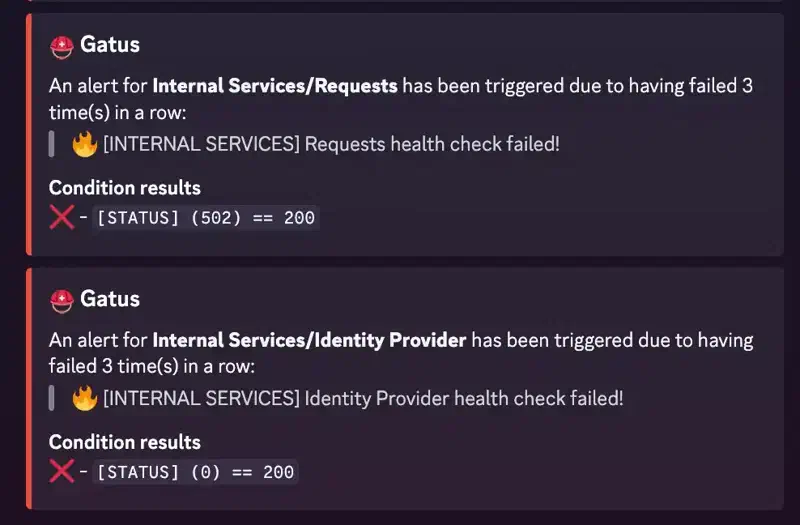
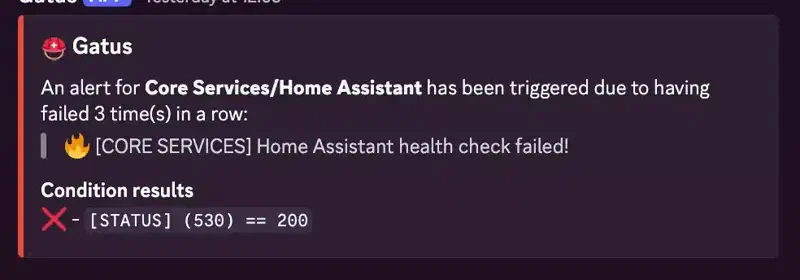
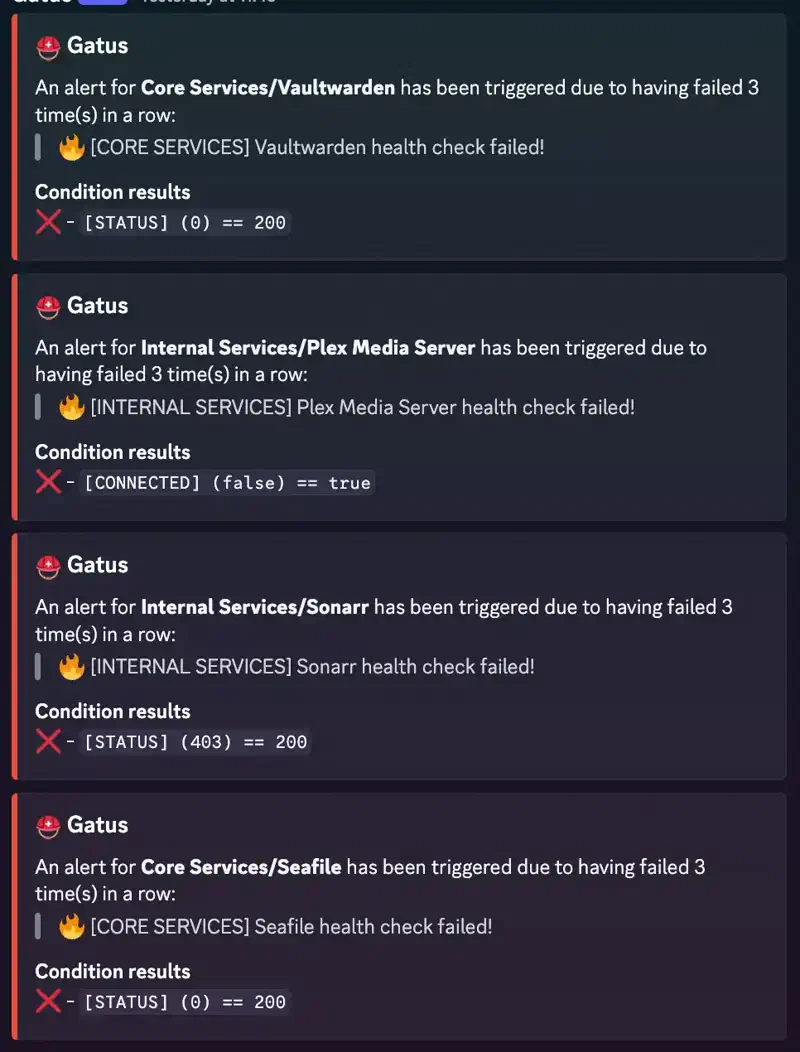
It is at this point I knew I had fucked up. No sooner had the sinking feeling in my stomach started than I noticed my MacBook had lost WiFi connectivity. I checked my phone; it was on 5G. I checked what was being broadcast and as expected, my WiFi network was not there, just a plethora of IoT devices in my flat that were now advertising their own SSID to be configured. Fuck.
I wasn’t too sure exactly what had happened at this point, but based on the notifications I had received and the fact that I had no network connectivity, I knew that it was widespread. Something I had messed up had propagated across my entire estate.
I cabled in directly to my switch and did not receive an IP address, not good. I set myself an address and started poking around. I still had access to OPNsense which was, at least, a good sign. OPNsense was reporting as healthy; internet was fine; routing was fine; all my WireGuard tunnels were up and running with BGP routing working as it should. I could access all my sites, and ping, seemingly everything, but I just couldn’t access any of my shit.
My attention was first and foremost focused on getting my local network back up and running, so I tried to access my local PVE host to see what was going on there. Nothing. I tried to SSH into it. Nothing. It was responding to pings. OPNsense was running fine, I knew that, so guests were still running on the host. It was responding to ICMP, but I couldn’t access it. What could this be?
Oh. Oh fuck.
It is at this point I really started to realise what had happened, just not to the extent yet. So, I couldn’t get to the PVE hosts, and everything runs on PVE hosts, so it stands to reason that the problem was with the PVE hosts. I was not aware that the few servers I have that are not PVE guests (NAS, for example) were also affected, but it had not occurred to me to test that yet. It didn’t really matter at this point.
⚕️ Local Recovery #
I was frantically trying to plug various IP KVMs into the host local to me, a Minisforum MS01. Nothing could get an IP address, so I was assigning and connecting to them over APIPA2 addresses. I say ’them’ because I tried multiple of them to no avail; they would report video and HID but I was unable to see any video output. I ended up having to pull the machine out of my rack and put it on my girlfriend’s desk (she was out today) and connect it up to her keyboard and monitor. This, of course, worked.
Logging in locally told me what I had suspected: the host had had nftables installed and enabled with the policy I had created for my VPS machines, drop everything bar ICMP, on every interface excluding lo. I disabled the service using systemctl mask --now nftables3, shut the machine down, plugged it back into the rack, and booted it up. A few minutes later, I was able to SSH into the host, success! Although, I still had no network connectivity…
WiFi was still down. DNS and DHCP were still broken. Why could this be? I tried SSH’ing to Technitium which runs DNS and DHCP across my network, and was denied. I tried pinging the server and it was responding.
Now I fully realised how badly I had fucked it. Not only had I firewalled off my PVE hosts, but every single one of my machines had also received this policy.
As I had access to the PVE host via SSH, I was able to run pct exec <vmid> -- systemctl mask --now nftables to mask the service on the guest as I did on the host, and finally the network came back online. IP addresses were assigned, DNS was resolving, DHCP was working, I was back in business, at home anyway.
If some of you are wondering why my WiFi went down, I do not assign static addresses to my UniFi APs. Whilst they continue to work without a functioning controller, they do not work if they do not have an IP address, and I have found this happens very quickly if the DHCP/DNS is not working, despite lease time.
⚕️ Offsite Recovery #
The vast majority of my services and machines are located offsite, in a business owned by my family. I do not pay for the electricity (👀), and there is a 10Gb/s pipe into the building, so it’s a no-brainer. What it does mean is that I cannot access the machines without driving an hour through London.
It just so happens that my girlfriend was due to visit that site, so I started thinking of how she could help. Some of the applications hosted there are for the business, so getting things back online was also important beyond just my own services.
There are 3 main PVE hosts at this site, one Minisforum MS01 and two custom builds:

SFF Homelab vSAN Cluster
The MS01 could be plugged into a keyboard and monitor, but it turns out all the monitors at that location were DisplayPort, and the MS01 only has HDMI and DP over USB-C, no good. The other two machines have no video output at all, so the only option was to plug a keyboard in and attempt to run the commands completely blind.
This did not go smoothly. The only wired keyboard at the site was completely dead. Every other keyboard there was wireless, which made it really hard to know if anything was actually registering. After a fair amount of back and forth, we worked out that the hosts needed a full power cycle with the keyboard dongle already plugged in before they would even pick up input. That did eventually work for the MS01, which was something. The other two weren’t having it, and blindly power cycling them without being able to see what was happening was becoming a bit risky, so I grabbed a bag of cables, adaptors, a GPU and various keyboards and drove down.
🔹 Pulling Disks #
With no way to get a console on the main two cluster hosts without pulling a PCIe card and plopping a GPU in there (which I had brought as a last resort), I had to get creative. I had a USB-SATA adaptor in my bag and my thinking was to plug the boot disk into another host I had access to, and manipulate the filesystem directly to stop nftables from starting.
Initially, I plugged the disk into the PVE host we had managed to fix blind, but ran into an issue: both the PVE disk of the host I was using and the disk I was plugging in were in an LVM group called pve, which meant mounting it became quite difficult.
Activating the second pve VG as-is failed outright; LVM refuses to create device-mapper nodes that would collide with the live host’s own pve-root/pve-swap:
device-mapper: create ioctl on pve-root ... failed: Device or resource busy
0 logical volume(s) in volume group "pve" now active
The fix was to rename the donor disk’s VG by UUID:
vgrename 1V7o7e-ffFg-2IXC-bZjG-u4wc-xgr3-Y06yzV pve-recovery
vgchange -ay pve-recovery
mount /dev/pve-recovery/root /mnt/recovery
From there, the actual fix was two lines:
ln -sf /dev/null /mnt/recovery/etc/systemd/system/nftables.service
rm -f /mnt/recovery/etc/systemd/system/sysinit.target.wants/nftables.service
Then, critically, rename the VG back to pve before it goes anywhere near booting again, because grub.cfg and /etc/fstab on that disk reference /dev/mapper/pve-root by name. The system simply would not have booted had I forgotten this step.
Whilst convoluted, this did end up working well. I was able to plug the disk into the host, and watched as it started responding to pings, meaning it had at the very least booted into PVE and the changes I had made to the boot SSD had not made things even worse.
As well as pinging, I was able to SSH to that host, so that was a massive relief. I gave the same treatment to the other host and was able to, eventually, SSH into that host as well.
Now the hosts were online and, crucially, accessible to manage. The next step was to get my services back online as they were still completely firewalled off.
🔄 Fixing Guests/Applications #
There are many reasons I run LXCs as opposed to VMs, and there are fewer, but still some good reasons I run Podman on these LXCs to run my applications, and this was a strength when it came to fixing the applications.
Once the hosts were back up and the LXCs were running, it was easy to run pct exec to mask the nftables service directly via the host’s SSH session. As I had no real way into the LXCs themselves, this was the only way to get LXCs to accept connections inbound. If I could not do this, I would need to console into the LXCs, which, for me, would be impossible as the only way in is via SSH keys. Had I been running VMs and in this state, I would have needed to boot each VM separately into a recovery environment to reset the root password/apply the fix, which would have taken a lot of time.
Had this been the case, I probably would have just restored the latest backups and called it a day.
The command was as simple as:
pct exec -- systemctl mask --now nftables I wrote a simple one-line bash script to apply this to every LXC on the host, and we were back in business, at least I thought.
Whilst SSH access was now possible, I was still seeing many issues with connectivity, so I kept investigating. This had to be nftables related, but how?
$ systemctl is-active nftables
inactive

$ systemctl is-enabled nftables
masked
Both say it’s off. It was, in fact, not off.
$ nft list ruleset
table inet filter {
    chain input {
        type filter hook input priority filter; policy drop;
        iifname "lo" accept comment "loopback"
        ct state invalid drop
        ct state { established, related } accept
        ip protocol icmp accept comment "ICMPv4"
        ip6 nexthdr ipv6-icmp accept comment "ICMPv6"
    }
    ...
}
I discovered the ruleset was never actually tied to the service’s own lifecycle. nftables.service is a Type=oneshot unit whose ExecStart runs nft -f /etc/nftables.conf once, and it does ship an ExecStop that runs nft flush ruleset, but my Ansible role reloads the ruleset via a handler that runs nft -f /etc/nftables.conf directly, completely outside systemctl. Masking the service tells systemd to stop tracking it and refuse future starts, but the kernel doesn’t care what systemd thinks it’s doing; the table that’s actually blocking traffic was loaded by a bare nft command, not by anything systemctl stop has a hook into. systemctl mask --now on a host like this gives you a firewall that’s “off” according to systemd but very much still live in the kernel.
The actual fix needed one more command, everywhere:
nft flush rulesetThis had been true for every host and every LXC fixed via mask --now for the entire recovery, including the HA quorum device container, which had been firewalled off from the rest of the cluster and had explained why one host being online was not enough to bring the cluster back online. This did confuse me at the time, but I was busy getting the other host to boot, so I didn’t think too much of it.
Once that command had been run, everything was back to normal, for the most part. Some LXCs needed rebooting. I’m not entirely sure why, but I was able to access them and the applications were running and accepting connections, but not sending anything back. A reload of the LXC fixed this, so I just assumed it was some kind of stale networking issue. I’ve seen a few of these in Podman over my time using it.
🔍 RCA #
Now for the interesting bit, what the fuck actually caused this?
A broken “skip hosts with no firewall config” check meant it ran against hosts: all instead of the few hosts it was meant for, deploying the default-deny nftables ruleset discussed earlier.
A dispatch_map.yml rule maps any change under ansible/roles/linux/firewall/** straight to:
- pattern: "ansible/roles/linux/firewall/**"
  playbook: "ansible/playbooks/linux/apply_firewall.yml"
  tags: [firewall]
No limit. The playbook was supposed to be safe to run against every host as I had written an explicit skip check:
pre_tasks:
  - name: Skip host if no firewall configuration defined
    ansible.builtin.meta: end_host
    when:
      - firewall_allowed_tcp_ports is not defined
      - firewall_allowed_udp_ports is not defined
      - firewall_restricted_tcp_ports is not defined
      - firewall_restricted_udp_ports is not defined
My thinking was that if a host hasn’t defined any firewall port variables, skip it and move on, only my cloud hosts had these variables set, and it had worked in my targeted deploy previously.
The problem was the role’s own defaults were set to empty lists:
firewall_allowed_tcp_ports: []
firewall_allowed_udp_ports: []
firewall_restricted_tcp_ports: []
firewall_restricted_udp_ports: []
Ansible merges role defaults into scope for the entire play the moment the role is listed under roles:, before pre_tasks ever runs, and regardless of whether the role itself has executed yet. So firewall_allowed_tcp_ports is not defined is always false for every host in the play. It’s “defined”, just empty; therefore the skip condition can never fire.
How did I not catch this in review? Well, that’s an easy one: I didn’t review it. I would have never thought to check this.
🛠️ The Fix #
Three layers of hardening went into the role, in order of how directly they address the actual bug.
- An explicit opt-in switch:
# defaults/main.yml
firewall_enabled: false# apply_firewall.yml
pre_tasks:
- name: Skip host unless firewall_enabled is explicitly true
ansible.builtin.meta: end_host
when: not (firewall_enabled | bool)A host now only gets this role if it explicitly says so in its own host_vars.
- A fail-loud safety net, in case a host opts in but forgets to actually allow anything:
- name: Refuse to deploy a firewall with no allowed ports/sources
  ansible.builtin.assert:
    that: >-
      (firewall_allowed_tcp_ports | default([]) | length) > 0
      or (firewall_allowed_udp_ports | default([]) | length) > 0
      or (firewall_restricted_tcp_ports | default([]) | length) > 0
      or (firewall_restricted_udp_ports | default([]) | length) > 0
      or (firewall_trusted_sources | default([]) | length) > 0
    fail_msg: >-
      firewall_enabled is true for {{ inventory_hostname }} but no ports or
      trusted sources are configured. With firewall_input_policy=drop this
      would reject ALL new inbound connections. Refusing to
continue.- A hardcoded SSH allow rule:
# Always allowed, independent of firewall_allowed_tcp_ports
tcp dport {{ firewall_management_ssh_port }} accept comment "management SSH — always allowed"
Realistically, this was a bit of overkill, but I would rather not make this mistake again.
🏁 Fin #
Thank you for reading, don’t be stupid like me.
muffn_ 🫶

Sony A7R III + Sigma 24-70mm f/2.8 DN DG ART @ 24mm, f/3.5, 1/500s, ISO 100
🦶 Footnotes #
-
Order 66 is a term used to describe the extermination of the Jedi by the Galactic Empire. ↩︎
-
APIPA (Automatic Private IP Addressing) is when a device assigns itself a link-local address in the 169.254.0.0/16 range because DHCP is unavailable. ↩︎
-
systemctl masksymlinks the unit to/dev/nullso it cannot be started again;--nowalso stops it immediately if it is already running. ↩︎